
Test your skills at identifying various calibrations from the sensor to the HMI on a typical Smart Transmitter loop.
Smart Transmitter - Identify Calibration Errors
Smart Transmitter End-to-End Calibration Check — Interactive Simulator
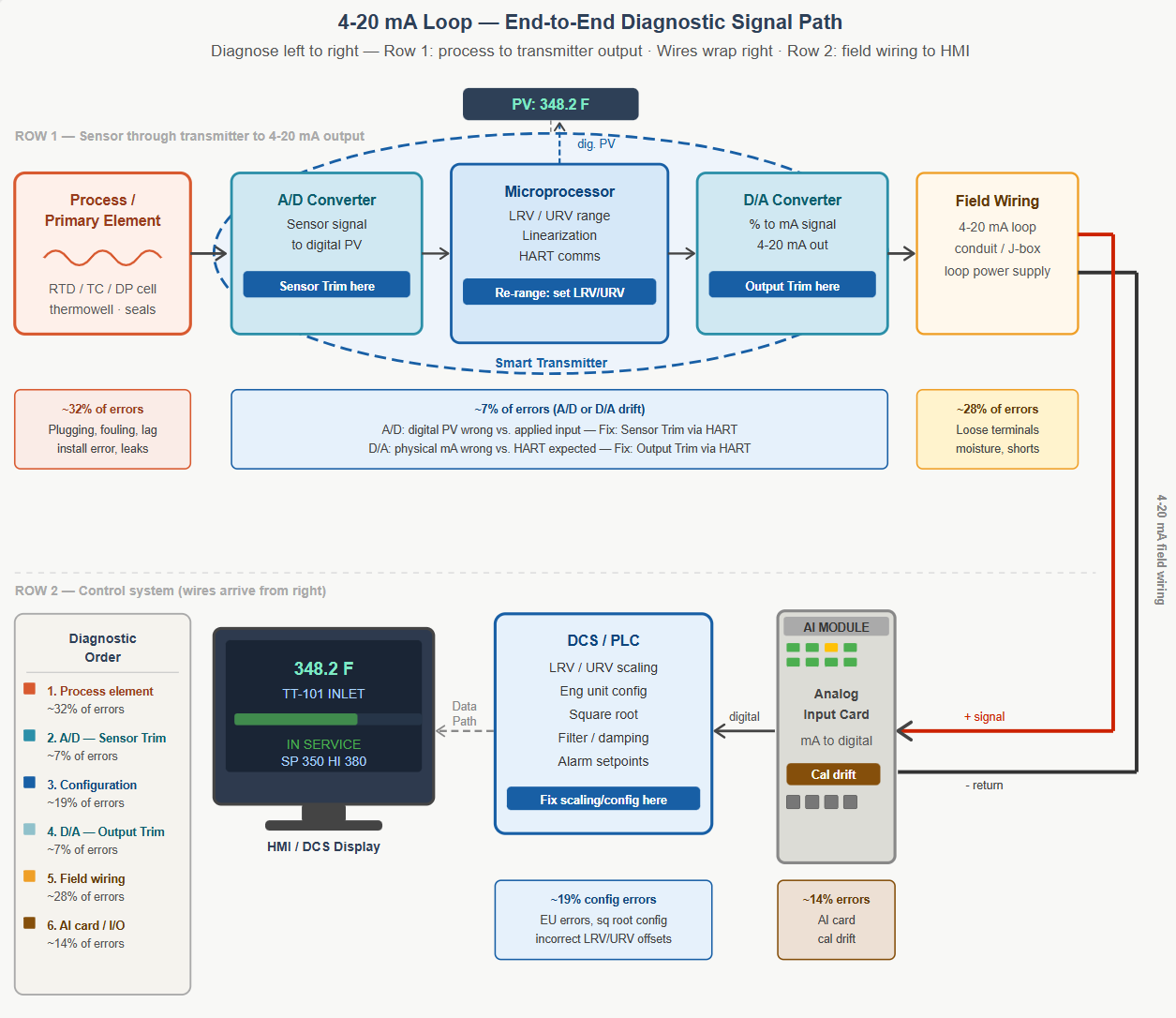
Most calibration errors on smart transmitters are not in the transmitter. The transmitter's A/D and D/A sections are stable, well-characterized, and rarely the root cause of a reading problem. Far more common are errors in the process connection, field wiring, AI card configuration, or controller scaling — sections that a traditional transmitter-only calibration procedure never touches. Understanding how to read a full set of loop data and identify which section is actually at fault is one of the most practical diagnostic skills an I&C technician can develop.
This simulator presents six real-world calibration check scenarios on a 0–200°F smart transmitter loop. Each scenario shows you a table of readings across the full signal path: simulated input, digital PV from the HART communicator or LCD, transmitter mA output at the terminals, field wiring mA arriving at the AI card, and the final HMI value. Your job is to study the data, identify where the error is, and determine the correct action — before clicking Reveal Answer. The scenarios cover A/D section drift, D/A section drift, LRV/URV offset masking, field wiring leakage faults in both directions, and the specific pattern left behind when someone uses the Z button as a calibration tool instead of a re-ranging tool.
Work through each scenario in order the first time. Scenario 5 in particular is worth slowing down on — it demonstrates exactly why checking only the mA output at zero tells you almost nothing about whether a transmitter is actually calibrated correctly. Use the Hint button if you want a nudge without giving away the answer. The signal path reference panel at the bottom of each scenario maps every column to the section of the loop it represents and reminds you of the diagnostic rule that governs the whole exercise: always work left to right, find the first column that diverges from expected, and fix there.
Smart Transmitter — End-to-End Calibration Check Simulator
Six scenarios using a 0–200°F transmitter (0.08 mA/°F). Study the data, identify the problem, then reveal the answer. | Orion Technical Solutions LLC
Range: 0–200°F = 4–20 mA (0.08 mA/°F) | Expected mA = ((EU − LRV) ÷ (URV − LRV)) × 16 + 4 | Config note shown below table where relevant.
| Simulated input |
Digital PV (HART / LCD) |
Tx mA output (at terminals) |
Field wiring mA (at AI card) — optional |
HMI / Controller value |
Status |
|---|
Each column maps to a specific section of the measurement loop. Always diagnose left to right — find the first column that diverges from expected, and that is where the error is.
- Digital PV (HART/LCD): Output of A/D section + microprocessor. Error here = Sensor Trim needed.
- Tx mA output (at terminals): Output of D/A section. Error here (when PV is correct) = Output Trim needed.
- Field wiring mA (at AI card) [optional/advanced]: Current arriving after passing through field wiring. Difference vs. Tx output = wiring leakage, partial short, or ground fault — not a transmitter issue.
- HMI / Controller value: Final value after AI card scaling. Error here (when field mA is correct) = AI card calibration error or controller scaling misconfiguration.
Diagnostic rule: Never adjust a downstream section to compensate for an upstream error. Fix the root cause.
Expected mA: ((EU input − LRV) ÷ (URV − LRV)) × 16 + 4 | For 0–200°F: 0°F=4.00, 100°F=12.00, 200°F=20.00 mA